
The TV guide data available through 4th Generation and legacy Tablo devices is collected from local broadcasters and aggregated and enhanced by a company called Gracenote.
However, TV guide data may not be available or correct for some channels for several reasons:
- The broadcaster may not have promptly provided data to Gracenote
- The broadcaster may opt not to provide data to Gracenote
- Gracenote may choose not to collect data for a channel, especially those that are independent or low power
- Within the database, TV guide data for a channel may not be associated with all ZIP codes that could potentially receive that channel
In these cases, your Tablo device will not display correct TV guide data for that channel within the Live TV Grid guide.
Keep reading to learn how to identify and potentially resolve cases of missing and incorrect TV guide data.
Table of Contents
Identifying Missing Guide Data
On 4th Generation Tablo apps, channels with missing guide data will display 'Programming Not Available' within the Live TV Grid.
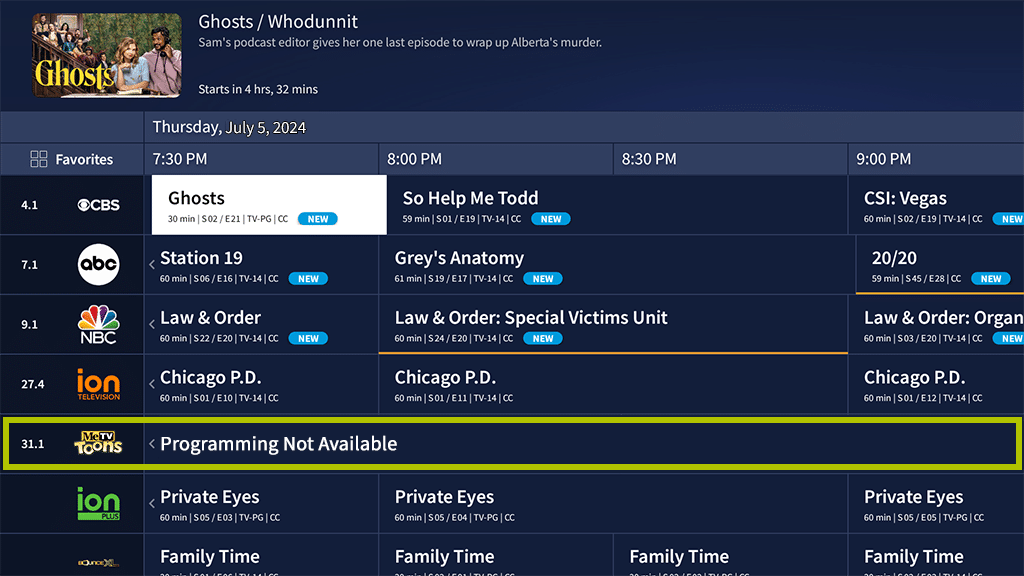
On legacy Tablo apps, channels with missing data will appear as a blank row within the Live TV Grid.
TV guide data processes differ between 4th Gen and legacy apps/devices. Legacy devices using legacy apps pull data directly from Gracenote's database. Guide data for 4th Gen devices, as well as legacy devices accessed via 4th Generation apps, is delivered first to Tablo servers before reaching individual devices.
Ingesting TV guide data on Tablo servers before distributing it allows us to adjust and correct data using our guide data management tools when required. Guide data on legacy devices using legacy apps cannot be corrected using our guide data management tools and instead relies on Gracenote to make changes in their database.
For this reason, TV guide data can appear differently for legacy users depending on whether they're accessing their Tablo with legacy or 4th Generation apps. This is also why we're not able to directly correct cases of missing or incorrect data for legacy apps. We can only make a request to Gracenote on your behalf.
Identifying Incorrect Guide Data
Incorrect guide data will be apparent if:
- The guide data associated with a channel is from a different channel in your lineup (i.e. your CBS channel displays the guide data from your NBC station)
- The data displayed is from the correct channel, but at an incorrect time (i.e. programs airing 3 hours in the future are shown as currently airing)
Watching and Recording a Channel with Incorrect Guide Data
You can still watch a live stream of any channel, even if it has no guide data, by selecting the channel ID (on the far left of the Live TV Grid).
However, it is not possible to schedule a recording for channels without TV guide data.
This is because Tablo schedules recordings using special program identifiers within the TV guide metadata instead of by date/time/channel. This allows Tablo to record all episodes of a series, even if the airtime or broadcast channel changes.
Owners of legacy Tablo DVRs can schedule manual recordings as a workaround, but scheduling recordings for channels with missing guide data on 4th Generation Tablo apps is not possible.
You can watch and record a show with incorrect guide data. However, recorded content will list it with the faulty data it was recorded under. If you ever start up a recording and it plays something different than what's listed, that's likely due to a guide data issue.
What to Do if You Have Missing or Incorrect TV Guide Data
If one or more of your channels have missing or incorrect TV guide data, there are two potential fixes:
- Option 1 - Change the location setting in your Tablo app
- Option 2 - Place a Guide Data Request ticket with Tablo Support
While we can accept guide data requests for legacy Tablo apps, we cannot guarantee that Gracenote will resolve them.
Option 1 - Change Your Location
Within Tablo's TV guide database, a channel with correct data may not be tied to your ZIP code but may be tied to one nearby. Editing your location in the SETTINGS screen of the Tablo app can help in these situations. When choosing a new ZIP code to enter, select one from a more urban area, ideally within 10 miles of your actual location.
Click here for how-to instructions for your Tablo model:
- How To Change Location on 4th Generation Tablo Devices
- How To Change Location on Network-Connected Legacy Tablo Devices
- How To Change Location on TV-Connected Legacy Tablo Devices
Option 2 - Place a Guide Data Request with Tablo Support
Thanks to our TV guide data management tools, we can accept requests to add missing or correct TV guide data for 4th Generation Tablo devices or legacy devices using 4th Generation apps.
For legacy apps, we can relay requests to fix missing or incorrect TV guide data to Gracenote, but can not guarantee a resolution.
Before making your request, we recommend that you:
-
Try Option 1 - Changing your Tablo's location in SETTINGS is often the quickest and easiest way to resolve cases of missing TV guide data.
-
Wait 48 hours after initial setup - Your Tablo will automatically attempt to match existing TV guide data with channels in your lineup after you finish setting up your device.
-
Wait 2 weeks for new channels - After the launch of a new over-the-air TV channel, please wait at least 14 days before placing a request, as the broadcaster is likely already working to provide data to Gracenote.
- Check the unresolvable channel list - Missing data cannot be resolved for some networks in some specific regions. Consult the list below for details.
If one or more of your channels is still missing or has incorrect TV guide data, please provide details to Tablo Support via the Guide Data Request Form. For 4th Gen apps, we'll try to resolve your case within 7-10 business days. For legacy apps, we cannot guarantee that Gracenote will resolve them.
Unresolvable Channels List
Unfortunately, some networks in specific regions do not provide TV guide data to Gracenote, other aggregators or local affiliates. We are unable to resolve cases of missing or incorrect data for these channels as no relevant program listings from other local affiliates are available.
| Channel Number | Location | Call Sign | Network |
| 15.5 | Phoenix, AZ | KNXV | HSN2 |
| 2.2 | Dallas, TX | KDTN-ES | Daystar Espanol |
| 39.6 | Phoenix, AZ | KTAZ | Nosey |
| 40.12 | Pheonix, AZ | KEJR | EMLW Infomercials |
| 25.3 | Corona, CA | KVEA | Telemundo |
| 20.2 | Los Angeles, CA | KNLA-CD | MBN |
| 14.2 | Phoenix, AZ | K14RK-D | GNTV Latino |
| 3.5 | Charlotte, NC | WBTV | Oxygen |
| 8.1 | Chicago, IL | WILC-CD | Daystar |
| 39.6 | Paradise, NV | KBLR | Nosey |